
Purpose
Scope
Use this SOP whenever a new Olson Homes project requires setting up including:
- Online
- Onsite Broker QR Form
- Onsite Prospect QR Form
The procedure covers HubSpot configuration and end-to-end testing. It does not cover creative production or physical placement of the finished QR code unless those tasks are specifically assigned as part of the launch.
Roles and responsibilities
- Process owner / HubSpot administrator — Completes configuration, workflow updates, testing and launch documentation.
- Olson Homes project contact — Confirms the official project name, assigned salespeople, email content, launch timing and final approval.
- Assigned salesperson or team — Confirms routing and receives the test registration or internal notification when applicable.
Required information before starting
- Official project display name and approved spelling/capitalization.
- HubSpot internal value or naming convention for the project option.
- Assigned salesperson, sales team or contact owner.
- Onsite prospect and broker form requirements.
- Approved Thank You for Registering email copy, links and sender details.
- Target launch date and person authorized to approve activation.
- Test contact details that will not interfere with live reporting.
Procedure
Confirm the project setup record — included in 8. Setup Record
Objective: Create one source of truth for the project before editing HubSpot.
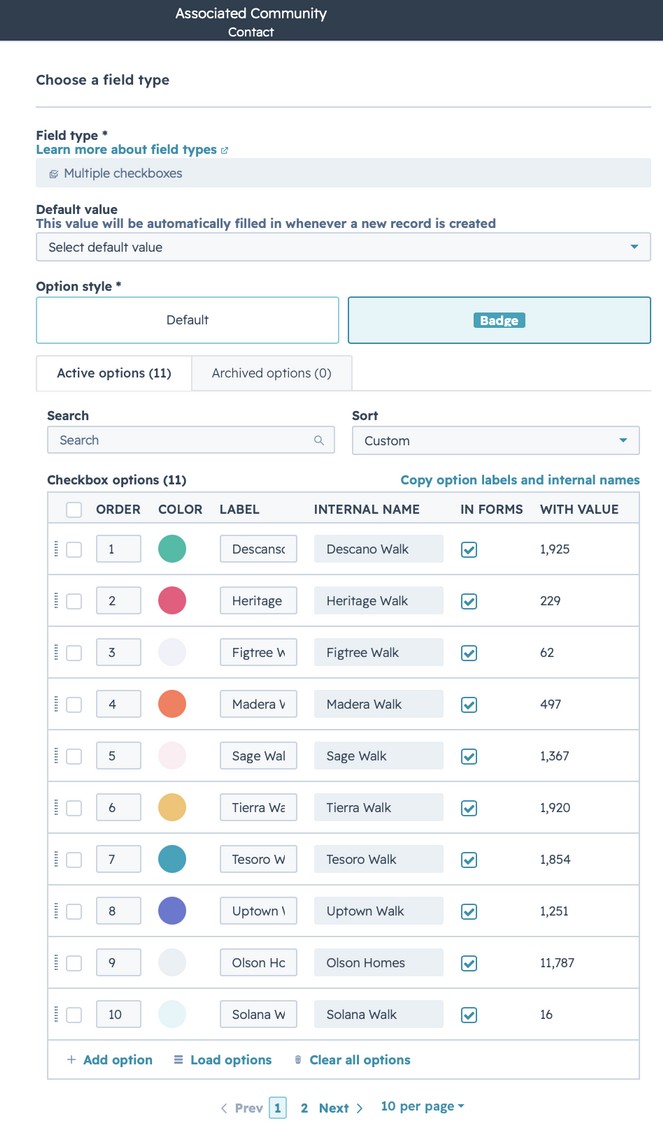
Update the Associated Communities property
Objective: Make the new project available through the single Associated Communities contact property used for both prospects and Realtors.
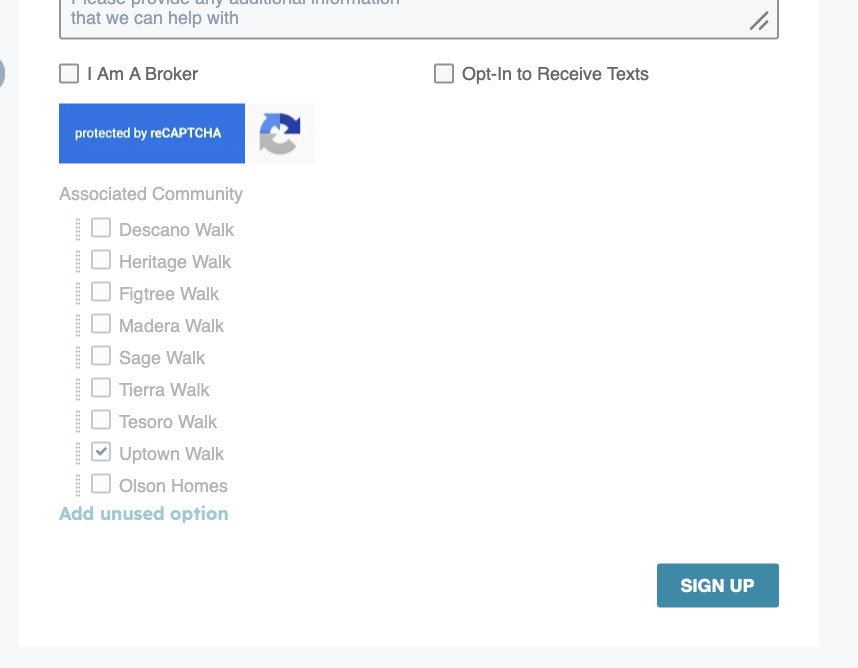
Create or update all onsite QR registration and online forms
Objective: Configure the new project's onsite prospect and broker/Realtor forms with the correct mappings.
Forms in scope
- ONSITE QR BROKER – (Project Name)
- ONSITE QR REGISTRATION – (Project Name)
- WEBSITE FORM – (Project Name)
- ONLINE REG-DELAYED FOLLOW UP – (Project Name)
Assign the appropriate salespeople to a new Team
Objective: Route registrations for the new project to the correct salesperson, team or contact owner.
Create the Thank You for Registering emails
Objective: Provide the correct follow-up experience for both registration paths.
Clone and configure the standard project sequences
Objective: Create the project-specific automation required for registration, routing and follow-up.
Replace all model-project references in the following:
- (Project Name) – ONLINE
- (Project Name) – ONLINE REALTOR
- (Project Name) – ONSITE
- HOMEBUYER IN ESCROW – (Project Name)
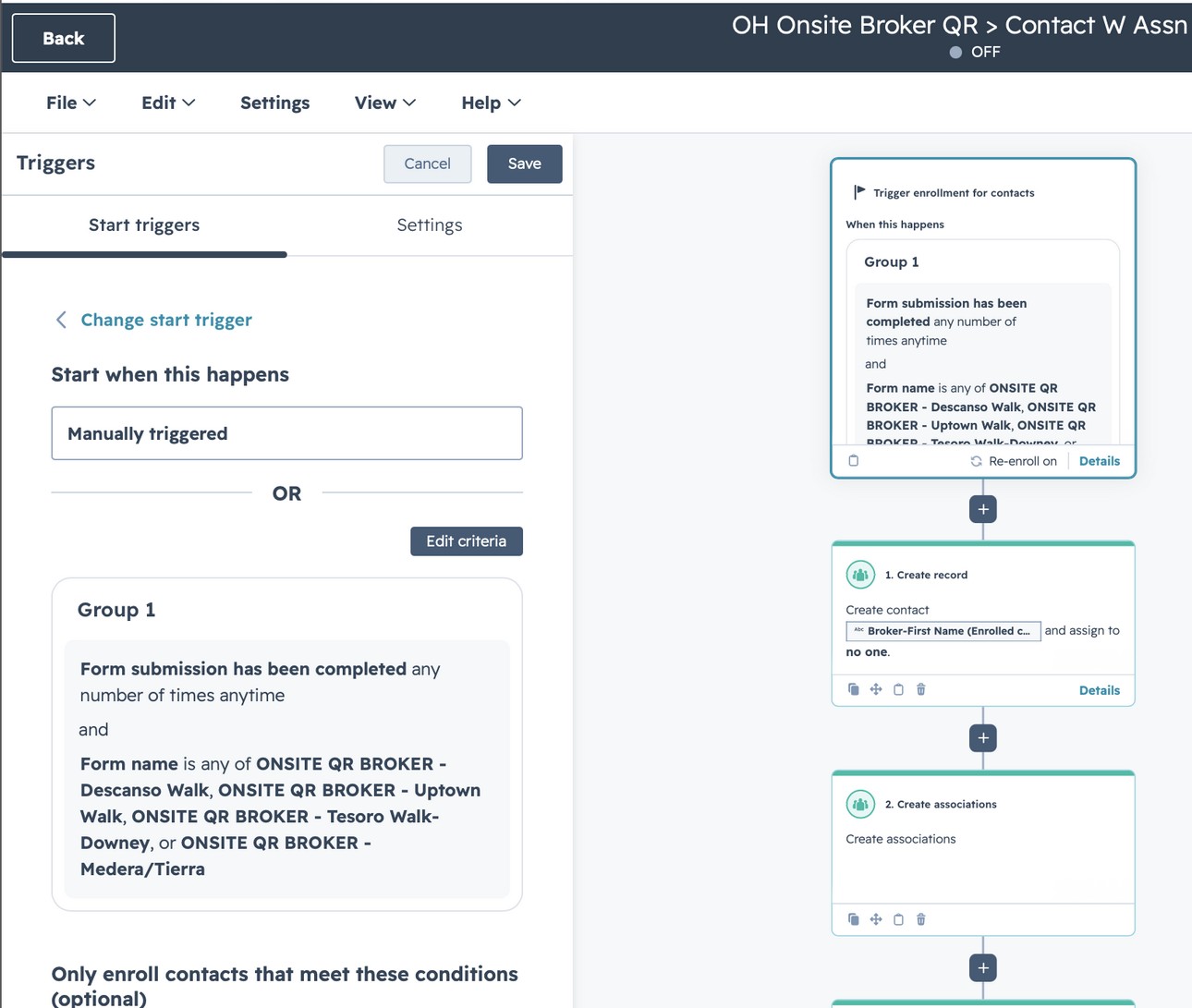
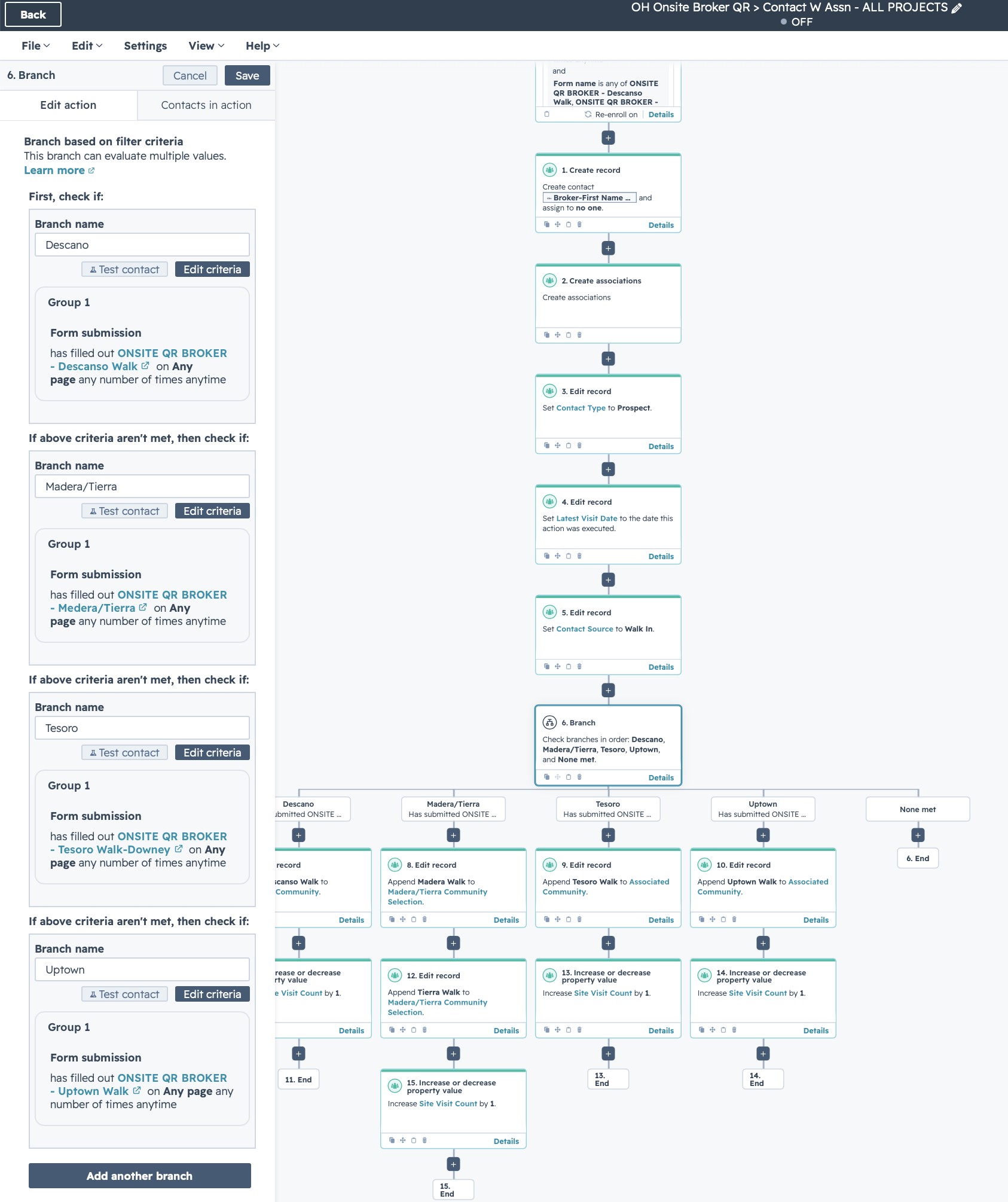
Update the Onsite Broker QR workflow
Objective: Add the new broker form and project logic to the shared workflow that creates and associates Realtor and prospect records.
Workflow
- OH Onsite Broker QR > Contact W Assn - ALL PROJECTS
| Action | Description |
|---|---|
| Form name | is any of ONSITE QR BROKER - Descanso Walk, ONSITE QR BROKER - Re-enroll on Details |
| 1. Create record | Create contact - Broker-First Name .. and assign to no one. |
| 2. Create associations | Create associations |
| 3. Edit record | Set Contact Type to Prospect. |
| 4. Edit record | Set Latest Visit Date to the date this action was executed. |
| 5. Edit record | Set Contact Source to Walk In. |
| 6. Branch | Check branches in order: Descano, Madera/Tierra, Tesoro, Uptown, and None met. |
| 7. Edit record (Descano) | Append Descano Walk to Associated Community. |
| 8. Edit record (Madera/Tierra) | Append Madera Walk to Madera/Tierra Community Selection. |
| 9. Edit record (Tesoro) | Append Tesoro Walk to Associated Community. |
| 10. Edit record (Uptown) | Append Uptown Walk to Associated Community. |
| 11. End | End |
| 12. Edit record | Append Tierra Walk to Madera/Tierra Community Selection. |
| 13. Increase or decrease property value | Increase Site Visit Count by 1. |
| 14. Increase or decrease property value | Increase Site Visit Count by 1. |
| 15. Increase or decrease property value | Increase Site Visit Count by 1. |
Update all other project specific workflows
Objective: Ensure the new project has the associated project workflows updated.
Workflows
- (Project Name) - ONSITE QR CODE
- (Project Name) - ONLINE REG-DELAYED FOLLOW UP
- (Project Name) - ONLINE REG-BUSINESS HOURS
Review lists, reporting and contact-record visibility
Objective: Ensure the new project appears anywhere Olson users monitor or filter registrations.
Complete end-to-end testing
Objective: Validate every registration path before allowing live enrollment.
Activate and document the project
Objective: Move the tested configuration into production with a clear audit trail.
Final launch checklist
Troubleshooting
- If an incorrect workflow was activated, turn off new enrollment before editing. Preserve workflow history for diagnosis.
- If a community value overwrites existing Realtor communities, stop the secondary workflow and correct the action from replace to append before retesting.
- If a contact does not enroll, verify the published form used in the test exactly matches the form referenced in the workflow trigger.
- If a project does not display on a contact record, confirm both the property option and the workflow action use the same approved value.
Setup record
Complete for each new project — saved automatically in this browser.
Need a printable copy?
Download the formatted PDF version of this SOP for sharing or archiving.